
Written in C#.
NOTE: Ragnarok MUST be the active window for this to work. If you can’t see it on your screen then this program can’t see it. This program acts as if you are constantly monitoring the window and acts accordingly. I recommend using this when you want to grind your homunculus while you sleep OR you have another computer to run this and RO on that you are not using.
If the RO window gets moved in anyway please reinput the values to reflect the new position.
1. Wait for your homunculus to get to 24 or lower hunger.
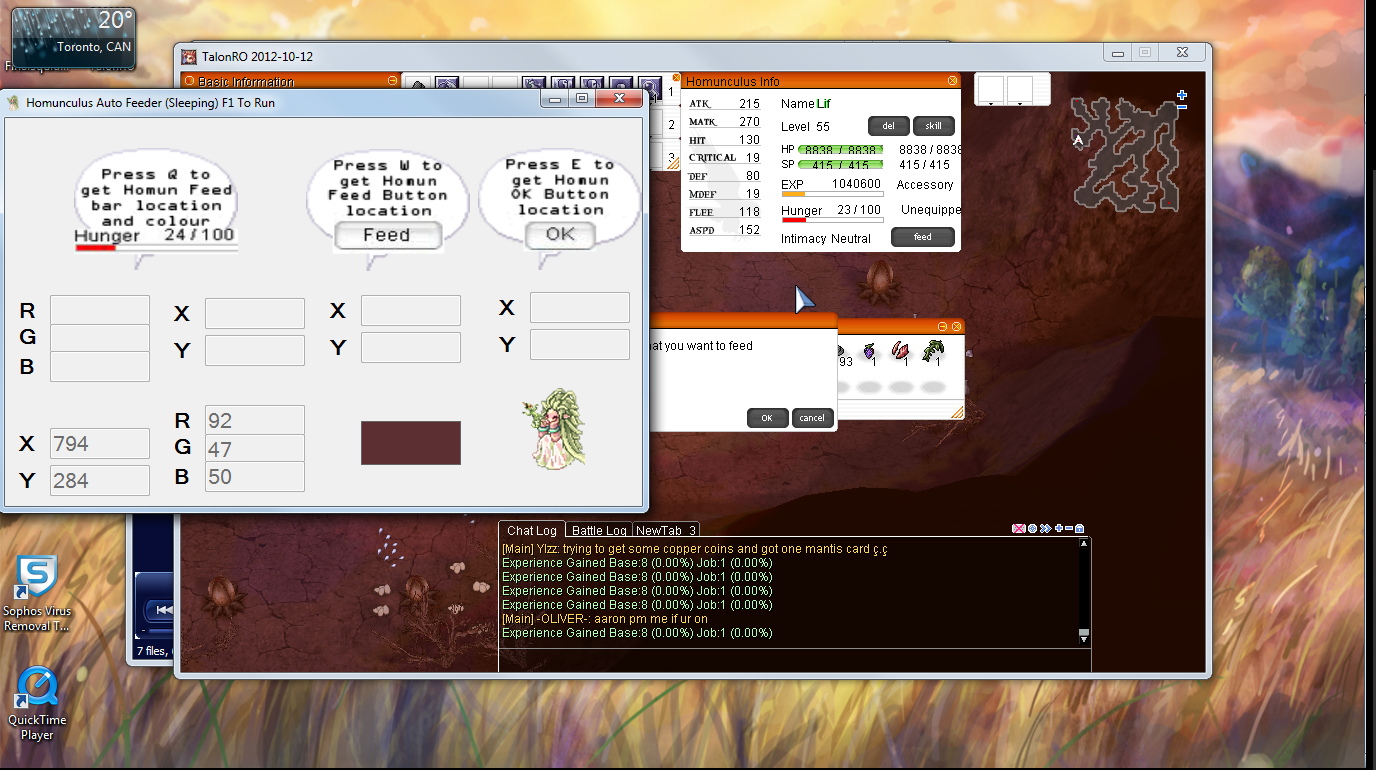
2. Press the Feed button so the confirmation window is open. This lets you get the hunger bar colour without the % popping up. Place cursor over the hunger bar of the homunculus to get the colour then press ‘Q’ to get the location and colour.
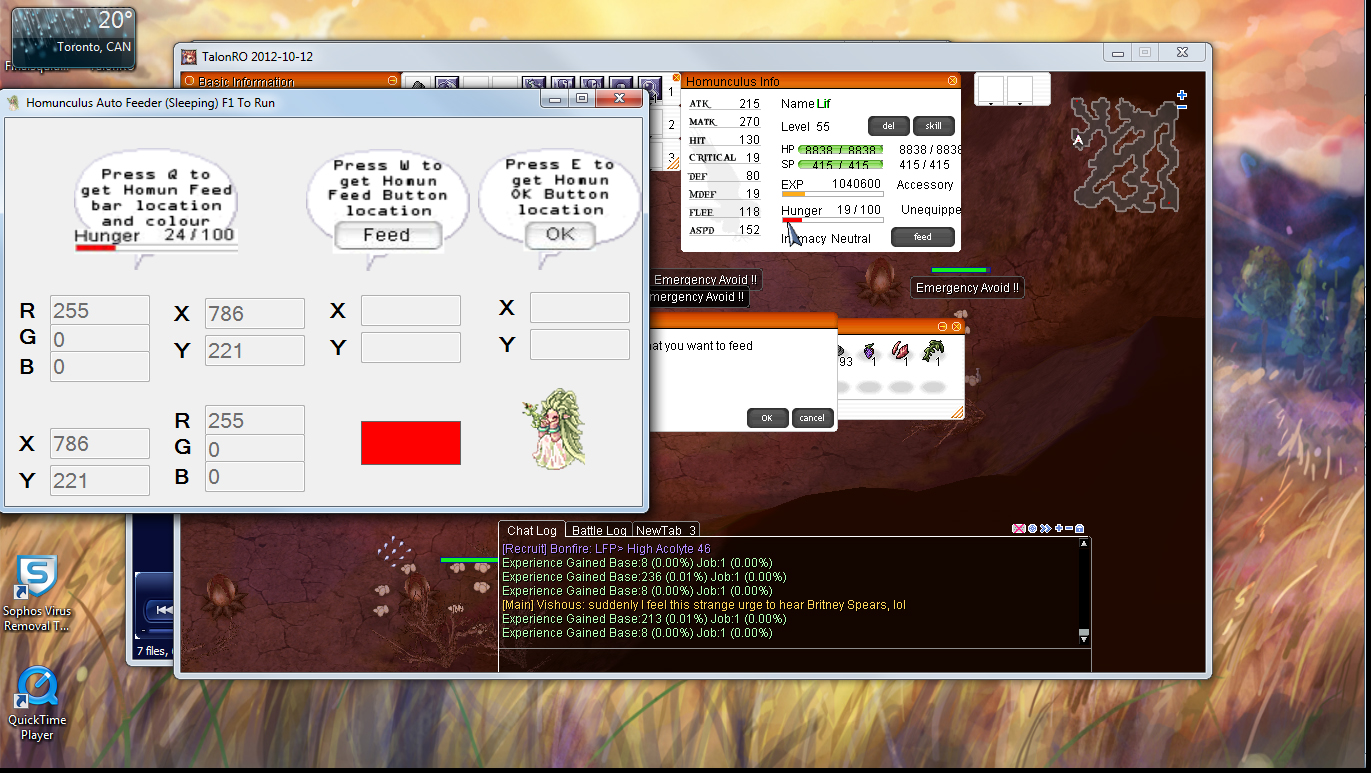
3. Place cursor over the Feed button and press ‘W’ to save the location.
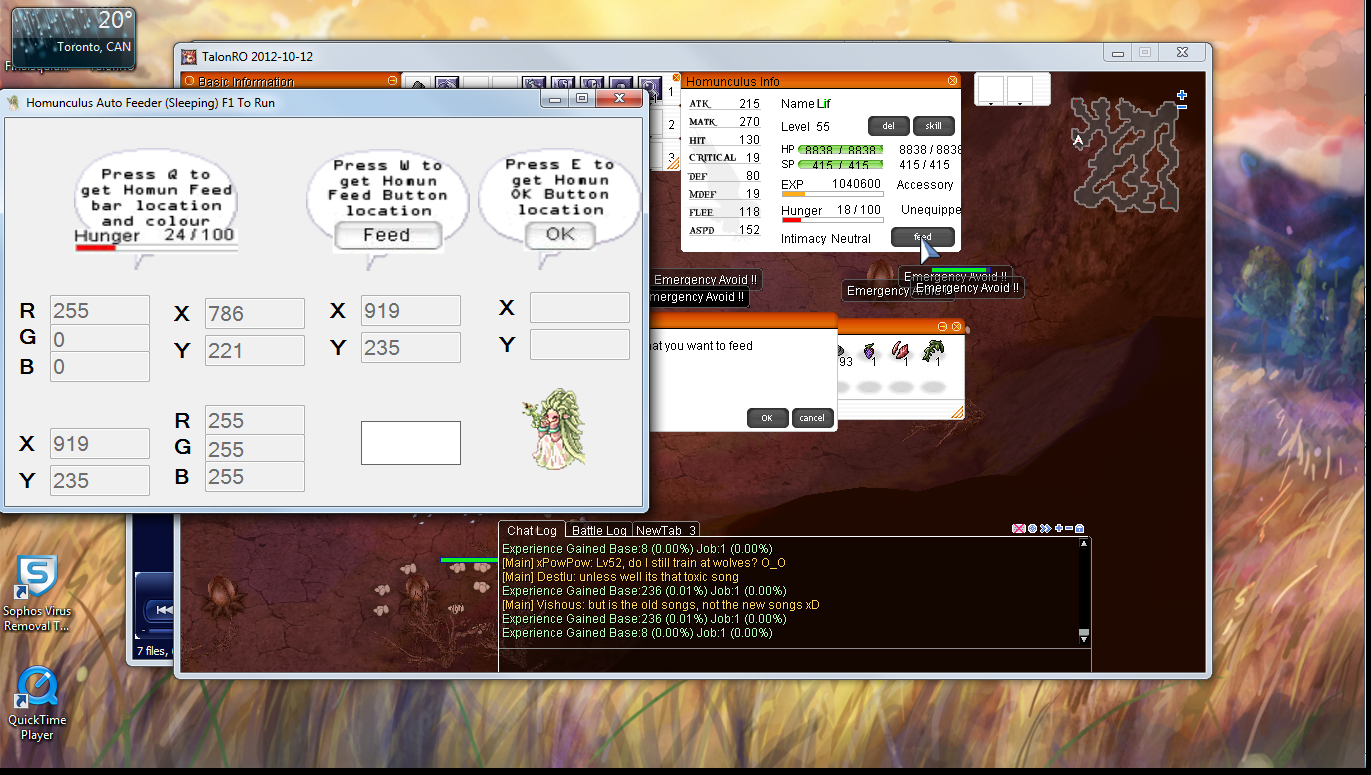
4. Place the cursor over the ‘OK’ button and press ‘E’ to record the location.
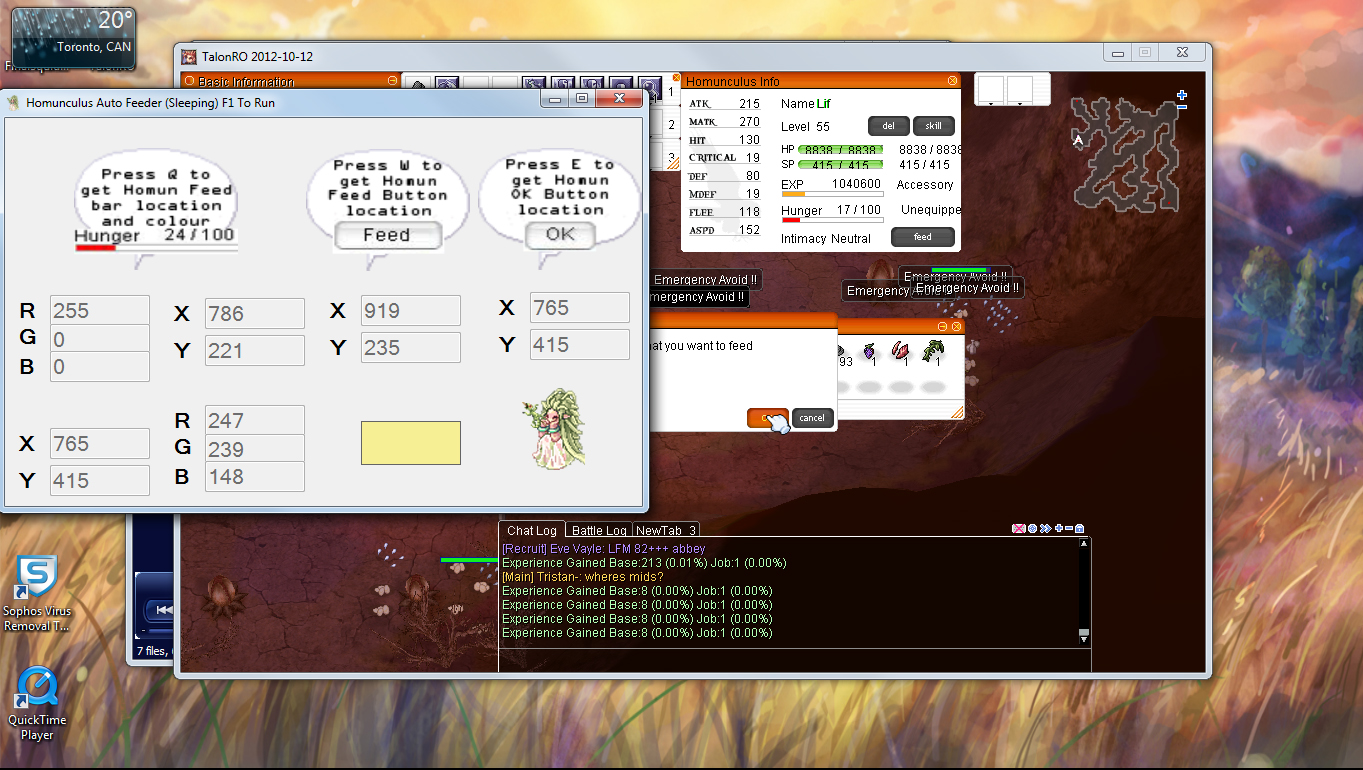
5.Press ‘F1’ to begin the program. Make Ragnarok the active window and walk away.

Hi, does this still work? I get an error about .Net Framework.
It is still working. If you could provide a screenshot of the error and your comp’s OS that would be helpful. I suspect that something is wrong with your .Net installations (missing/corrupt/etc).
Check out this page for info on how to reinstall/repair .Net packages
http://support.microsoft.com/kb/kb976982
I’m getting the same problem too. My .Net Framework is just installed and checked.
The error goes:
Parameter must be positive and < Width
Parameter name : x.
Nvm, silly me. It was the error from before updating.
Works great now. Thanks
Hmm, it’s now causing my comp to hang totally when I use it
Now that is an interesting result. There is a slim chance that the program is saved on a bad part of your hard drive. You should check to see if there is anything wrong with it. Other than that I can’t really figure out why it would cause your comp to hang. Could you post your OS? I’ve only tested with Windows 7 so that may be a problem.
I’m actually using Windows 7 too. Resorted to hand feeding at the moment.
On the verge of giving up this pet lol.
The only thing I can think of at the moment is to put the feeder on a usb and run it off that in case it is something with your hard drive. Another thing that could cause it to hang is your ram. Try closing all other programs other than this and RO. I could only test on my machines which are a comp with 8gb and and a laptop with 3gb.
It worked fine for the first time, but then when i closed the .exe window and reopen it again, it didn’t work. How this is supposed to work? Great job by the way for creating this genius software.
What do you mean it didn’t work again? Does it crash or throw an error? The program doesn’t save your values from the previous session so you have to input them every time you open it. If you could post your OS that would be helpful.
I see. I did re-input the values again. But the second time after I put a new output, the feeder did not respondIng at all. I am using win 7.
Never mind. I think i got it =)
If you did anything special to get it to work again I would love to hear it. Other people might have the same problems and I’m sure it’ll help them too.
When you switch to other windows, sometimes the software would not respond to your client. In that case, simply restart the RO client. Also remember that if the hunger is lower than the memorized location, you’ll need to either adjust ot again, or feed it.
That is what I did to make it works again, because on the other day i forgot to check after switching windows and my homun lost bunch of points.
Hmmm..that’s why I made the original program on VB6,…[dot] .NET it’s quite …hmmm not friendly… I like your Style… =)
im using windows XP and u cant open the program.. though a friend of mine uses windows 7 and he ca open it with no problem
never mind.. i was able to fix it.. im just waiting for the server to finish its mainte.. tnx bro
I kind of get it to work but it just doesn’t click feed. The mouse moves from the feed button on the info window to the feed button on the message window but it does nothing. It just keeps going back and forth.
That’s interesting. So it clicks once on the info window and successfully triggers the confirmation window but then continuously fails on the OK button? There’s a slight chance that the location you registered for the OK button is off and you just need to redo it.
It isn’t triggering the feed button either but it is moving to the proper places. It’s like it isn’t clicking. It doesn’t work at all if HomunFeeder isn’t the active window and if the homun hits 24% it will make homunfeeder the active window.
Oh!? It’s not clicking at all? It shouldn’t be making the feeder the active window while running under any circumstance. What OS are you using and is RO in window mode or full screen? To test if it really isn’t clicking set it so that it’s on a solid colour and the click points to anywhere and see if it makes your character walk or set the points between two windows and see if it properly activates them.
but it will not move if the auto feed is not active window
sry forgot to add im using windows 7, RO is windowed (tried full screen doesnt do anything)
Could you go to your C:WindowsMicrosoft.NET folder and check both of your framework folders and list all the folders with “v” in the name? I’m trying to figure out what is causing this on my end. Worse case scenario is that I’ll have to rewrite this in a new language for people who can’t get it to work.
ive found some folders with “V” in folder in it in framework and framework64.
framework “v” folders :
v1.0.3705
v1.1.4322
v2.0.50727
v3.0
v3.5
v4.0.30319
(in that order)
“v” in framework64:
v2.0.50727
v3.0
v3.5
v4.0.30319
(in that order)
Thanks. At least I know it’s not a problem with having different frameworks.
countering the same problem… even my friend use it perfectly using windows 7 too…
I had it on windowed mode. I haven’t tried it on full screen mode. I originally did not have the autofeeder as the active window but when it tries to work it will automatically switch from RO being the active window to the feeder being active. Very strange. My OS is windows 7.
Could you go to your C:WindowsMicrosoft.NET folder and check both of your framework folders and list all the folders with “v” in the name? I’m trying to figure out what is causing this on my end. Worse case scenario is that I’ll have to rewrite this in a new language for people who can’t get it to work.
is this till working? can you send me download link?
Sorry about that, an update removed all my download files from the post. It should be there now. There’s a problem with it not working some machines that I’m trying to solve so I can’t say for sure it will work for you but please give it a shot and report back if it does or not.
hi. i am trying to use it on windows 7 and i cant seem to get it to work properly. running RO in windowed mode. (i checked the framework folder and it has all the same folders listed in the previous comment by jed exactly)
from what i noticed:
when am trying to get the coordinates, the mouse location seems to be giving me the right values. however i noticed that when you switch from the homuncfeeder window to the RO window (whether via mouse click or alt tab), the mouse cursor jumps a distance away from where it was (alt tabbing multiple times seems to remedy this but it still ruins the first switch from when you press F1 to run the feeder). i am assuming pressing F1 does not automatically switch the active window so i do that myself but i also noticed that it tries to run the movements right away when i press F1 (since the hunger bar is at the red 24% already) but it doesn’t click anything. am guessing that’s intentional but when i switch it to RO as the active window it doesn’t try to do it again.
i also noticed that it won’t actually move the mouse while RO is the active window but it does move the mouse when the feeder it the active window. but while the feeder is the active window, it doesn’t seem to click the mouse button since it doesn’t go into the RO window, it just moves the cursor to the locations.
Thanks for this detailed report. This helps me narrow down where the break in the code is. Just a few things that might be relevant: are you using more then 1 monitor? If yes: is RO and the autofeeder on the the main monitor, the secondary monitor or are both of them on two different monitors? What Server are you playing on? (There’s a chance that this has been protected against and I just didn’t know about it.)
was trying to use it on iRO, the one on steam.
at the time of testing no i was not using multiple monitors. just my laptop
Ok, I spent the night testing the feeder on the iRO chaos server on both my laptop and my comp. Both worked fine but I was able to see the shifting of coordinates like you described on my laptop. I’m still trying to figure out if the clicking issue is due to conflicting software or hardware.
maybe i am setting it up wrong or something.
i did notice though that the mouse movements only happen when i mouse over the hunger bar when it is below 24% (red) and the homuncfeeder is the active window, not when RO is the active window.
Another post reminded me of this but have you been running this program as the admin? Also, what you are describing there is what happens when you get the % colour. To get the feed bar colour you need open the Feed confirmation window so that when you mouse over the feed bar the % doesn’t pop up.
Ok. So just recently tried this. A little playing around to get it to work right, but heres how i do it. This is Win7 btw.
1. Run program as admin, and position towards left side of my screen.
2. Open RO client and login to character, find where i want to be.
3. Alt + R to open homun window, move it to right side of screen
4. Click on FEED, and hover mouse over OK when it asks if you are sure (but dont click OK – this just takes the blue away from the FEED button). Doing all this also ensures that when you hover mouse over health bar to get colour and co-ords, you dont get the % showing, which changes the colour to that crimson red instead of bright red.
5. Alt Tab back to feeder program. Hover mouse over health bar when BRIGHT RED – press Q. Hover Mouse over any part of the FEED button – press W. Hover mouse over the BLACK lettering of the OK button – press E.
6. Press F1 – this should switch it back to your RO window and do the first feed. If not, recheck your steps.
Hope this helps. It was a trial and error thing for me.
I totally forgot that “run as admin” was an option. That may be the reason why some Win 7 users can get the program to move but not click or run while not in focus. I’ll ask this to the others. Thanks for posting this.
Yea. I ran it as it comes initially, and again later when i was testing. Found that running as is, and not as admin, didn’t seem to see work. I run it as admin, and follow my steps, and it works flawlessly. I even go off screen or to another client, and when i come back to the homun, it will detect the red health bar trigger, then feed, then ok. But yea, had to have the feeding process done up to the OK confirmation, and make sure i hovered over the OK button. If i didn’t hover it over that OK button, the blue tinge would still be on the FEED button, and if you tell the program to look for the Blue tinge colour, its not going to work? I dont think. I’ll try this now actually.
Well, seems to work easier like that.
1. Run program as admin, and position towards left side of my screen.
2. Open RO client and login to character, find where i want to be.
3. Alt + R to open homun window, move it to right side of screen
4. Click on FEED, to get confirmation box.
5. Alt Tab back to feeder program. Hover mouse over health bar when BRIGHT RED – press Q. Hover Mouse over any part of the FEED button – press W. Hover mouse over any part of the OK button – press E.
6. Press F1 – this should switch it back to your RO window and do the first feed. If not, recheck your steps.
Should work, if not, retry steps carefully.
Ok, confirmed. Can start the program before or after the RO client, but you definitely need to run it as admin for it work. Otherwise, running smooth.
Works well, Tested under W7 x64.
Great software, nice job dude
Thankyou!
Yea I think the main issue, from reading other posts, is about running the program as admin, and making sure the you click Feed and get the confirmation window up before getting colours and co-ordinates.
sir is this program works on multiple client ? thanks in advance for the answer sir and more power
It does not work on multiple clients since the x and y coords of everything will be different. You should be able to open multiple instances of the bot however and give them each their own client to handle. As long as the bots and you can see the area it needs to click on it should work fine in theory.
so this only works on win7? not working on winxp? just want to make sure.
I personally haven’t tried it on xp since I no longer have a machine with it. I would be grateful if you could give it a try so I could get more data on what this can run on.
Thx it’s worked, i hope haven’t error or trouble of it, thankzz ^_^
Okay it works fine all the way to the point where it should register a click.
It actually moves to the desired locations and all, but the clicks arent registering.
Do you know how to solve this problem?
thanks for your effort. cheers
Are you running it as administrator?
you need to have it done all the way up to pressing ok for feeding. The colour registers different if you dont have that. If you hover over it without the confirmation boxes open, it changes to a darker shade. So you program will go to the location, but it cant register the right colour. Follow my steps in a previous post.
i cant get it to work. does it work even if the gameguard is harmony?
I’ve used it on servers that use harmony and it worked fine. What OS are you using? Are you running it as administrator? Does the program just move the mouse but not click or does it do nothing at all?
it works like a charm, its my fault by not following the instruction about getting the red color :)).. thanks bro
Hey, i have a problem.
The mouse movement is correct, it goes to the feed button and then it clicks, but after that it wont go to the ok button.
After spamming alt-tab, the mouse started to go to ‘Ok’ button. It seems like the program is not responding.
Can you tell me what can i do? I ran the program as admin and i’m using win7
Hi,
Can’t get to work here, even using as admin, is like the mouse is moving and clicking under the Rag screen…
And I’m also trying to do the same program in C#, in my I did the part o moving the mouse in the screen using global position, but can’t send the clicks for some reason…
Not too sure where it is breaking. Do you have the latest .net framework?
4.5.1 SDK, 4.6 SDK / RC
hi it’s working (almost)
the pointer changes and everything, but the only problem is that the click part
it’s not clicking it just moves to feed then to the ok location but it doesn’t click
First try running the program as Admin and see if that works.
If that doesn’t work then use this tool to see which .Net framework you currently have on your pc
In the textbox it will show what framework you have already like this near the top
[This is from my pc]
< Installed .NET Frameworks >
.NET FW 2.0 SP 2 (CLR:2.0)
.NET FW 3.0 SP 2 (CLR:2.0)
.NET FW 3.5 SP 1 (CLR:2.0)
.NET FW 4.5.2 (CLR:4.0)
I’m not sure if the code I’m using has been removed from the latest version of .Net so if the tool shows that you don’t have 2.0, 3.0, or 3.5 use the green arrow to download it.
Install them one at a time and check if the feeder works after each installation.
i think it doesnt work on windows XP
the colour picker doesnt seem to pick the right colours on the cursor
nvm i lowered my resolution it started picking the right colours
Is it still working? I tried it but the mouse doesn’t move at all. I try putting it on hunger bar, i move automatically to feed button but it didn’t do anything
Are you running it as Admin?
I want to try it but I dont want to get banned 🙁
I want to try it but i dont want to get banned
It works if I keep putting he cursor back at the health bar but if I dont it will not auto feed. Help!
Follow this step
1. Run program as admin, and position towards left side of my screen.
2. Open RO client and login to character, find where i want to be.
3. Alt + R to open homun window, move it to right side of screen
4. Click on FEED, to get confirmation box.
5. Alt Tab back to feeder program. Hover mouse over health bar when BRIGHT RED – press Q. Hover Mouse over any part of the FEED button – press W. Hover mouse over any part of the OK button – press E.
6. Press F1 – this should switch it back to your RO window and do the first feed. If not, recheck your steps. (On iRO I found that i need to do the first feed, and then Press F1 and it works like a charm. It wouldn’t work if I press F1 before the first feed. Not sure what the problem is)
Should work, if not, retry steps carefully.
Perfect. Thank you so much
can you show the video please
please give the video
Sure, i will try to do it, first time.
Followed all the steps, but nothing happens, tried everything in this chat, =( can’t use.
I put the right color, the right places, and when i hit f1 and alt tan, nothing happens..
bRO (Brazil) Thor Server windowed 800×600
Windows 7 32 bit
Same .Net folder
Color red 255,0,0
i have a problem, it doesn’t work in my laptop, but it works in my desktop.. T_T
my mouse is moving, then in click button is not working..
I cant get the right color. its not seeing the health bar
I cant get the right color. its not seeing the health bar please help
Hello, can this bypass gepard shield?
it’s working for me like 4days straight then, suddenly the mouse pointer just move around not clicking anymore
Comments are closed.